PROJECT / 01
That first blinking light.
Start with timing and a single output. Change the pause, inspect the code, and understand what the loop does.
A small program with a visible purposeYOUR IDEAS. YOUR COMPUTER. REAL HARDWARE.
Build your first electronics program. Understand the code behind it. Give your project a screen, a control, a little life.
Local-first visual development for ESP32 · In development · No public download yet
Fresh captures from the current desktop build. Explore the workspace, display tools and lessons before diving into the roadmap.
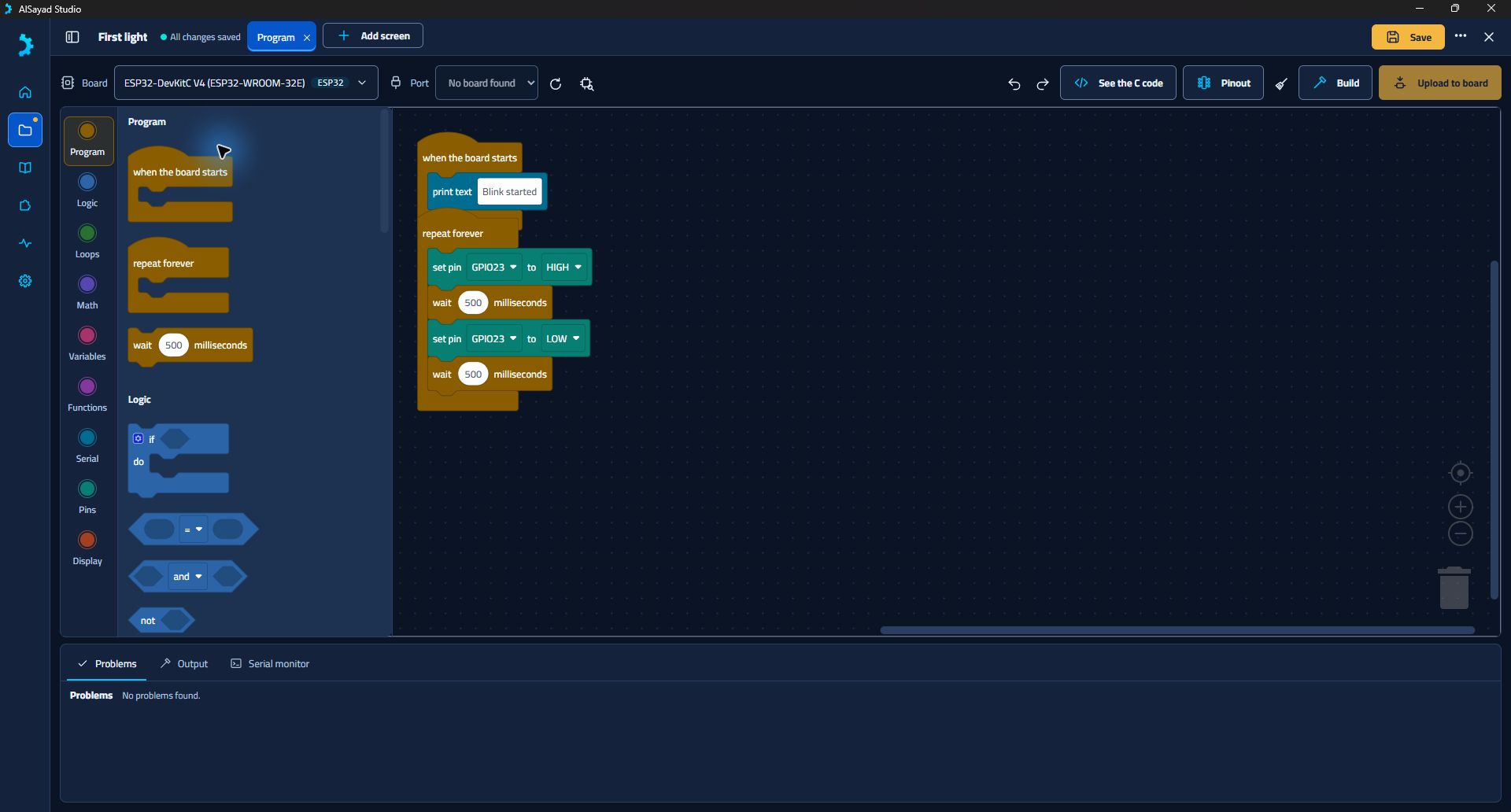
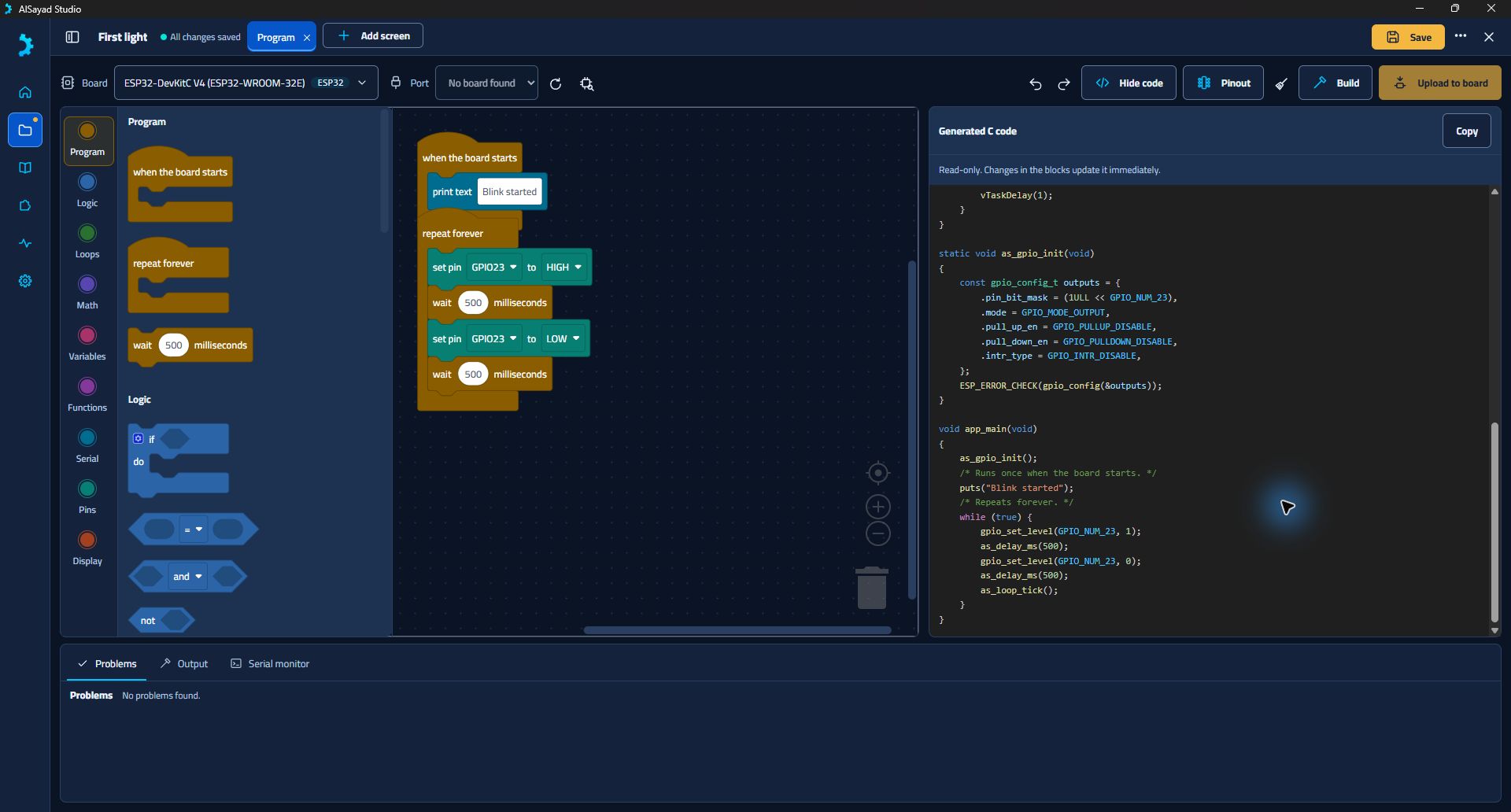
The same program, in two forms. Arrange a visual loop and inspect the ESP-IDF C it generates, right beside your workspace.
The complete blinking-LED example from Studio’s own source. The code view is read-only; changes to blocks update the generated source.
A program that starts once. A loop that repeats. A pin that changes state. Build up your understanding one block at a time.
Logic, loops, math, variables, functions, serial and pin blocks share one workspace. This capture shows a local demo project, not a running board.
Lay out labels, buttons, switches, sliders and images in a visual screen editor. Connect your controls to display blocks in the program.
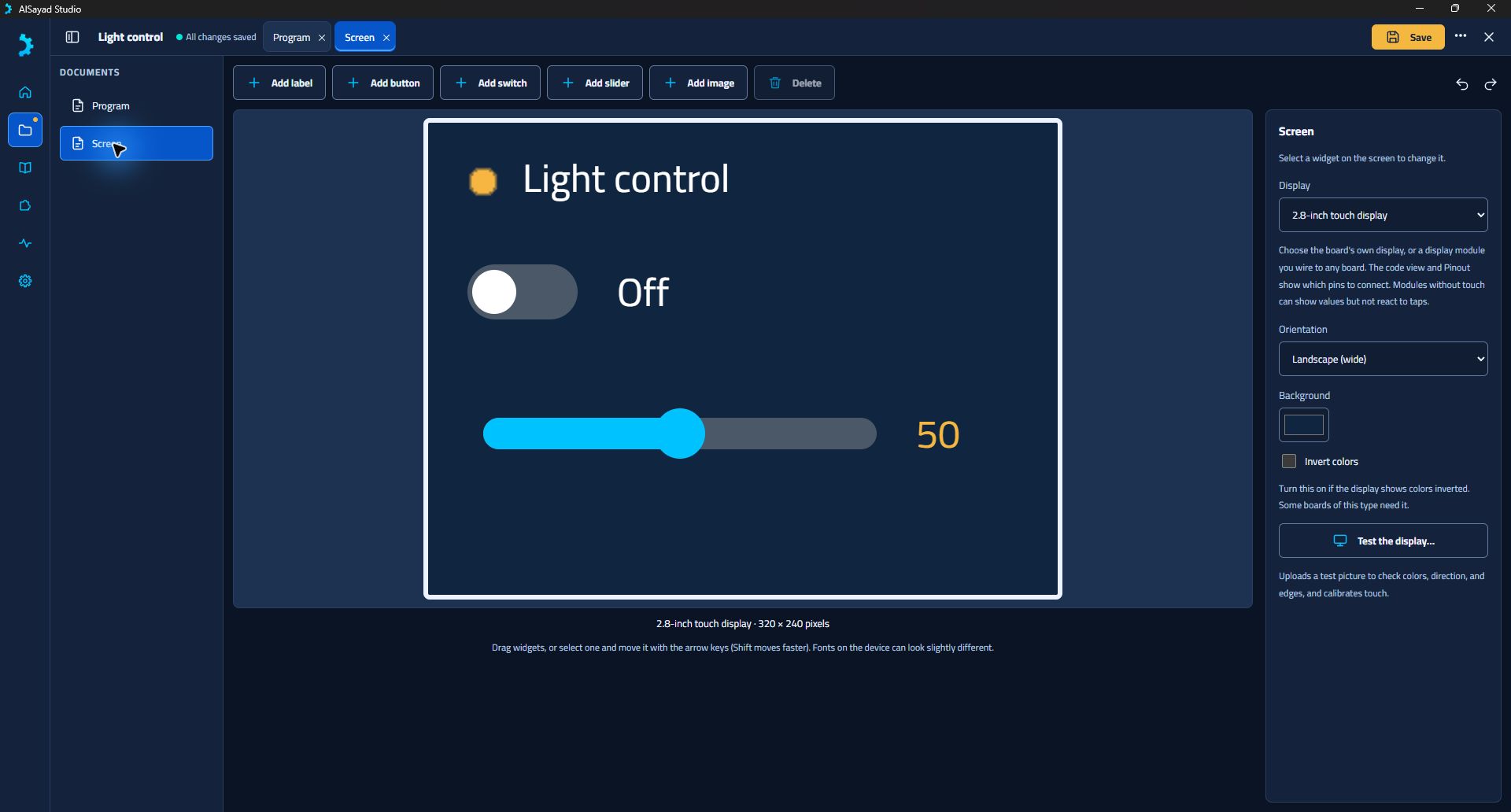
The editor preview helps with layout. Generated display firmware has compilation evidence; physical display acceptance is still pending.
Choose a round GC9A01 module, see its circular boundary, and review the wiring for your selected board.
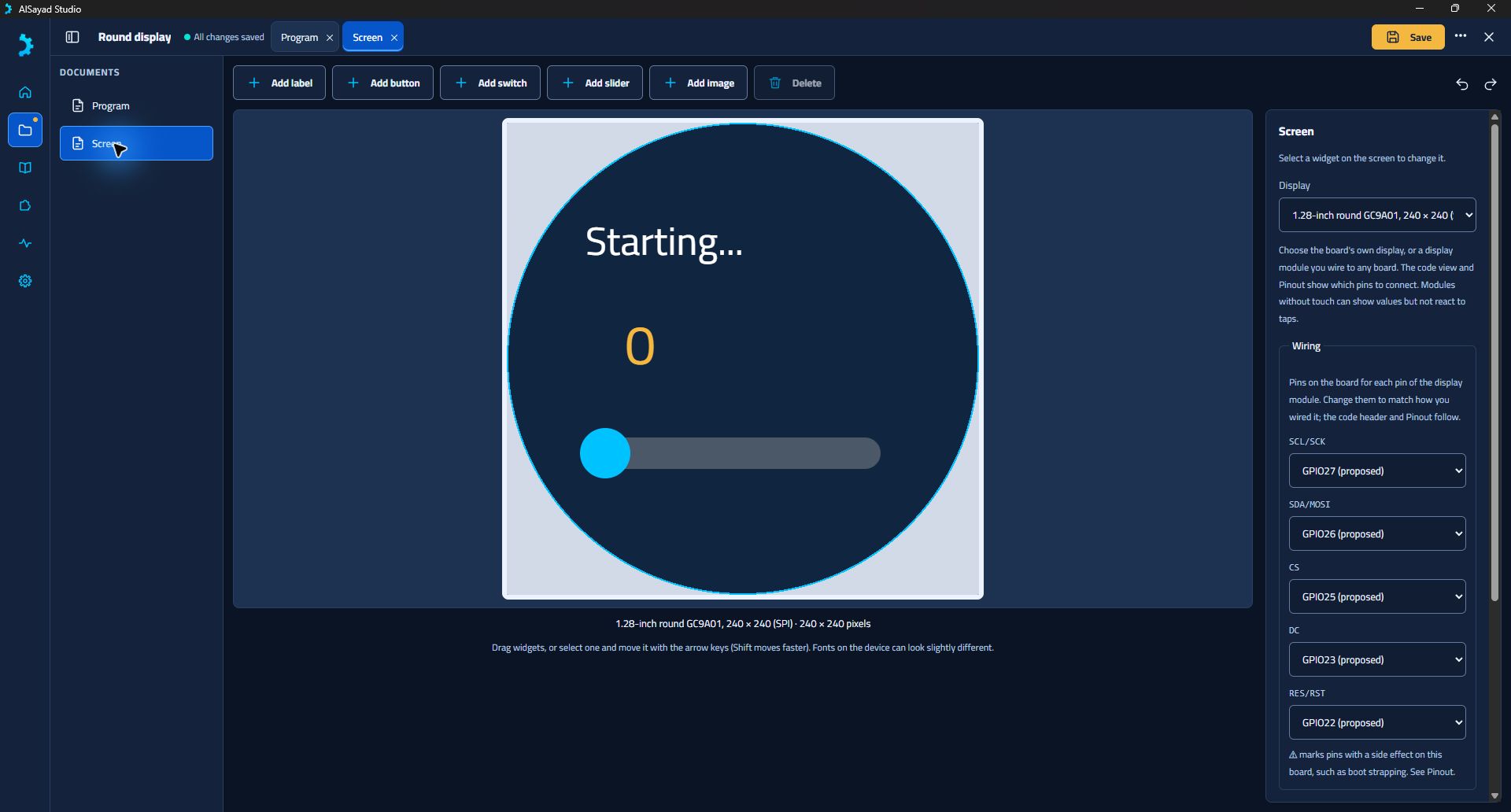
Round-panel support and wiring controls are implemented. The module’s colors, timing and physical behavior still need bench validation.
Keep the board’s pin map beside your program. See pin uses and capabilities while you make choices about your circuit.
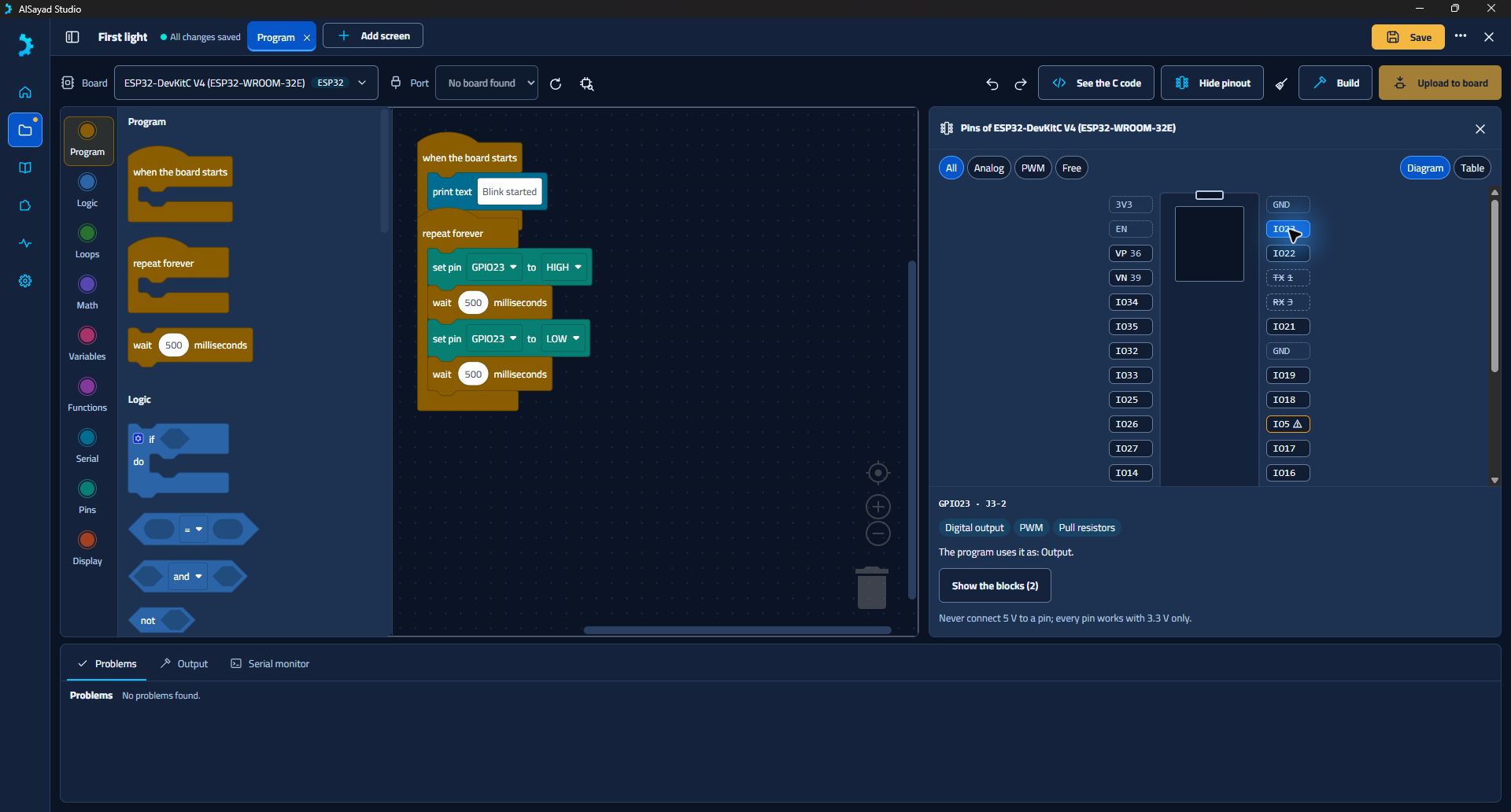
The catalogue has 23 documented board/module profiles. Pin descriptions and compile coverage are separate from physical-board validation.
Parts, wiring, steps and troubleshooting live with the starter program. A lesson becomes your own editable local project.
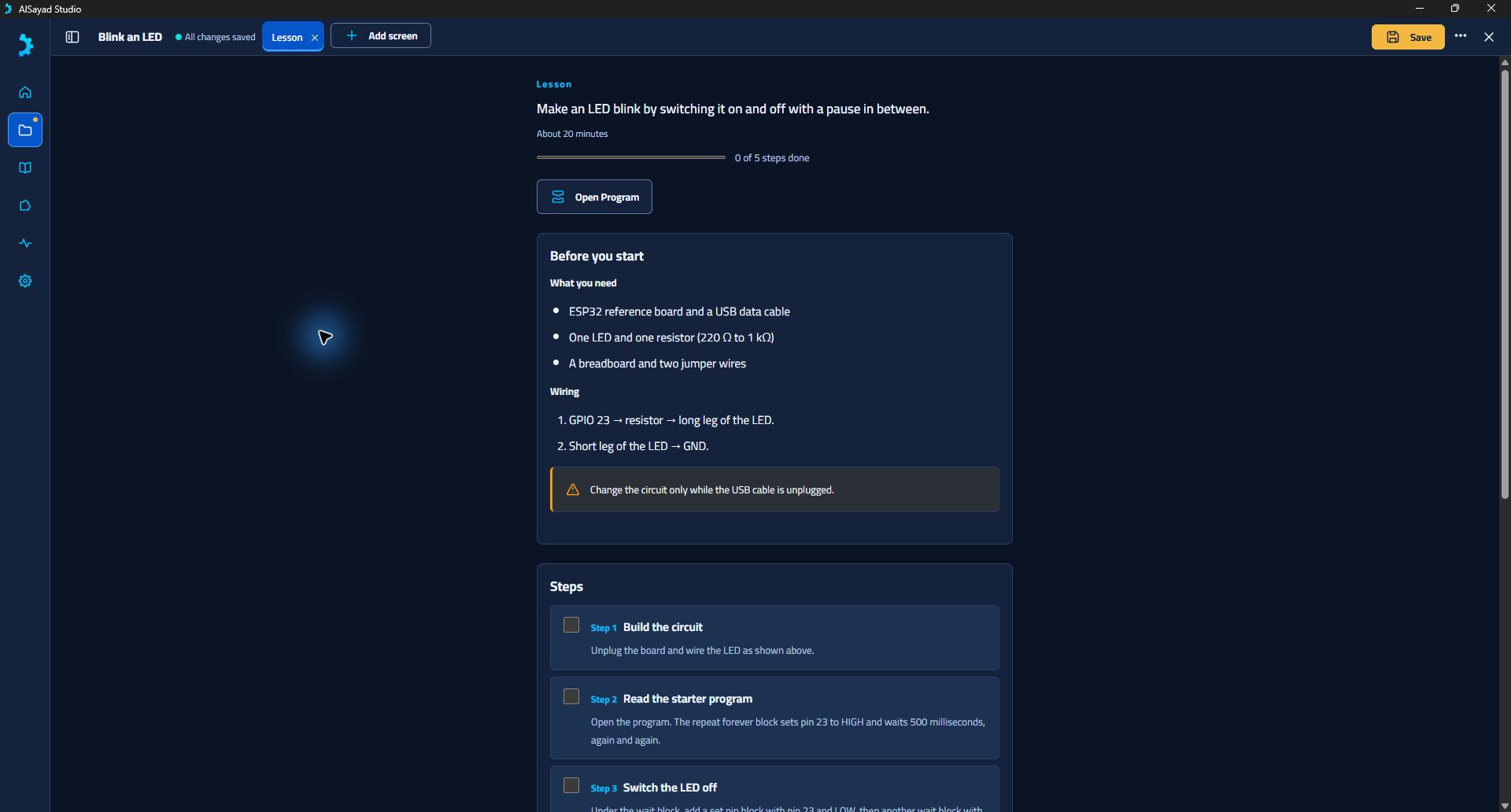
Three bundled lessons cover LED timing, button input and analog/PWM control. Classroom pilots and some hardware checks remain open.
Captured on · Actual desktop captures with local demo projects. No hardware was connected or flashed for these screenshots.
These are real example projects opened in Studio. The next step is yours: change a value, try a control, ask what happens.
Start with timing and a single output. Change the pause, inspect the code, and understand what the loop does.
A small program with a visible purposeArrange a switch and a brightness slider. Explore how visual controls connect to your program’s display blocks.
Editor implemented · Display bench test pendingTry the round-display example. Lay out a counter inside the circular boundary and inspect the proposed wiring.
GC9A01 module · Hardware validation pendingA closer look at the workflow. The interface below is an actual development capture; the guided explanations are a website walkthrough.
The prototype includes blocks for logic, loops, variables, functions, serial output and GPIO. Projects can be saved and reopened locally.
// Excerpt from Studio’s generated blink fixture.
// GPIO 23 drives an external LED.
void app_main(void)
{
    as_gpio_init();
    puts("Blink started");
    while (true) {
        gpio_set_level(GPIO_NUM_23, 1);
        as_delay_ms(500);
        gpio_set_level(GPIO_NUM_23, 0);
        as_delay_ms(500);
        as_loop_tick();
    }
}
Real generated-source excerpt. Initialization, includes and helper functions are in the complete example ↓.
Change the pause. Change the rhythm. See the relationship between your logic and a physical output.
Illustrative animation, not a live simulator or connection to a board.
Fresh capture from the Windows desktop development build. A local example project is open; no board is connected in this screenshot.
Start with a visible result. Change one thing. Ask why. The prototype’s bundled lessons connect a small circuit, a block program and a practical explanation.
Lesson content is implemented. Classroom use and the analog/PWM bench test are still pending.
Visual building blocks, guided lessons and a visible route from an idea to a program.
Inspect the generated C, explore board pins and keep your projects in local files.
Account-free local learning is a core principle. Teacher feedback and classroom pilots are a next step.
“Implemented” means it exists in the development prototype. It does not mean released, fully tested on every board, or ready for a classroom rollout.
Create, save and reopen projects. Recovery support, Notes, Guided and Professional interfaces, and light/dark themes are implemented.
Logic, loops, functions, GPIO and serial blocks generate inspectable C. Firmware fixtures have been compiled with real ESP-IDF.
The end-to-end workflow has run on Windows with an ESP32-DevKitC. Broader hardware and cross-platform release checks are still open.
23 documented board/module profiles, pinout views and pin diagnostics. Firmware fixtures cover 10 ESP-IDF chips; this is not 23 bench-tested boards.
Blink an LED, control a light with a button, and dim with a knob. Each lesson becomes an editable local project with a step-by-step guide.
Arrange labels, buttons, switches, sliders and images. Choose built-in or external display modules, including a round GC9A01 panel. Display-board acceptance remains open.
Finish clean-machine setup, installer recovery, device disconnect tests, signed Windows distribution and Mac verification/notarization.
Bench-test the additional board profiles, analog/PWM projects and generated display firmware. A successful compiler result is only one part of acceptance.
A managed offline-archive installation has succeeded on Windows. Online installation, UI timing, recovery and full disconnected setup still need work.
Sign-in and offline-grant code is tested with scripted services. There is no production account service or real user sign-in yet.
Signed file packages and a developer SDK exist. Production signing, catalog, downloads and a purchase experience are not available.
Organization roles and shared-device licensing are implemented with scripted tests. A hosted service, full administration UI and real classroom pilot remain.
Explore explanations and programming help that support understanding. This is a future idea, with no committed implementation or release date.
Investigate opportunities around robotics, circuits, PCB design, simulation and CAD integration. These are directions to validate, not promised features.
A public submission process, reviewed catalog and paid third-party packages require further product, security and operational work.
Status reviewed against the plan, source and implementation evidence on . No public beta or paid offering is live. Read the evidence & limitations ↗
The next milestone is a trustworthy beta. These are priorities and directions, with no fixed delivery dates.
Local projects, visual programming and the reference-board build/upload workflow exist in development, with Windows evidence.
Working prototypeFinish installation and recovery checks, hardware testing, Apple Silicon validation, signing and beginner documentation.
Current priorityExpand verified hardware coverage, test the display workflow, pilot lessons, and develop the service and extension foundations into usable experiences.
In developmentConsider a reviewed ecosystem, optional AI and wider engineering integrations as demand, resources and validation allow.
Future explorationAlSayad Studio is an independent effort to make electronics programming easier to enter and easier to understand. The foundation is working. The next challenge is making it dependable for people beyond the developer’s desk.
If a crowdfunding campaign moves forward, the proposed focus is practical:
AlSayad starts with a simple habit: build something, understand how it works, and make the process useful to someone else. Studio brings that same curiosity into software.From the AlSayad project mission · Make. Experiment. Discover.
Good projects earn trust through clear expectations. Here is where Studio stands today.
Explore the development recordThere is no public release yet. Internal unsigned installers exist for testing. The next priority is a dependable beta with release validation, signing and clear installation guidance.
Development evidence is strongest on Windows x64 with the ESP32-DevKitC. Apple Silicon macOS is a required target and has some compilation evidence, but full release acceptance is pending. There are 23 documented ESP32 board/module profiles with firmware compilation across 10 chips; additional profiles are not yet bench-validated. Intel Macs, Linux and mobile are outside the initial beta scope.
The free local workflow needs no AlSayad account. Projects and compilation stay on your computer. Offline use is the design goal after the required toolchain and dependencies are provisioned; full disconnected provisioning and recovery are still being validated.
The current editor supports labels, buttons, switches, sliders and images on one screen. You can choose built-in or external display modules, including a round GC9A01 panel, and review or change external-module wiring. Generated firmware has compilation evidence, but display-board bench acceptance is still pending. The preview helps with layout and is not an LVGL simulator.
No. AI and wider engineering integrations are future exploration. Signed extension files, a developer SDK, account/licensing code, purchase-backend code and organization foundations exist, but no public marketplace, production account service, checkout or classroom deployment is live.
The product direction keeps a useful free local application. Optional paid extensions, Pro or education offerings are being considered. Prices, reward tiers, license terms and any crowdfunding offer have not been finalized.
Clean installation, large toolchain downloads, USB drivers, hardware variants, offline recovery, Mac behavior, signing and support all need careful validation. Studio is developed independently, so scope and timing depend on available resources and test results.
The hero, gallery and lesson images are fresh captures from the native Windows development build, taken on 6 November 2026. They show local example projects, with no firmware uploaded for the captures. They show the current editing tools and do not imply classroom deployment or completed hardware acceptance.